作者:AlbertWen
添加时间:2014-11-17 16:26:20
修改时间:2026-10-08 13:37:30
分类:
06.Linux软件安装
编辑
参考文章:Memcached集群/分布式/高可用 及 Magent缓存代理搭建过程 详解,搭建Magent,在编译的过程中会出现很多错误:
执行到 make 的时候,
报错1:
gcc -Wall -g -O2 -I/usr/local/include -m64 -c -o magent.o magent.c
magent.c: In function 'writev_list':
magent.c:729: error: 'SSIZE_MAX' undeclared (first use in this function)
magent.c:729: error: (Each undeclared identifier is reported only once
magent.c:729: error: for each function it appears in.)
make: *** [magent.o] Error 1
作者:AlbertWen
添加时间:2014-03-29 16:29:00
修改时间:2026-10-13 08:13:43
分类:
06.Linux软件安装
编辑
网卡eth0 IP修改为 102.168.0.1
ifconfig eth0 102.168.0.1 netmask 255.255.255.0
作者:AlbertWen
添加时间:2013-08-16 23:21:05
修改时间:2026-10-19 21:11:06
分类:
06.Linux软件安装
编辑
2、安装 PHP 5.2.17
./configure --prefix=/usr/local/php --with-apxs2=/usr/local/apache/bin/apxs --with-config-file-path=/etc --with-config-file-scan-dir=/etc/php.d --with-openssl --with-zlib --with-bz2 --with-gettext --with-mhash --with-mcrypt --with-iconv=/usr/local/libiconv --with-curl --with-gd --with-jpeg-dir --with-png-dir --with-freetype-dir --with-mysql=/usr/local/mysql --with-pdo-mysql=/usr/local/mysql --enable-gd-native-ttf --enable-bcmath --enable-mbstring --enable-zip --enable-soap --enable-sockets --enable-ftp --without-pear
作者:AlbertWen
添加时间:2017-10-29 21:28:08
修改时间:2026-10-19 15:33:57
分类:
06.Linux软件安装
编辑
参考先前的文章(Ubuntu 14 安装并破解SSH工具 SecureCRT),破解安装 SecureCRT-7.3 成功,但是破解安装 SecureFX-7.3 时就一直报错:
Insufficient privileges, please switch the root account. at securecrt_linux_crack.pl line 88.
作者:AlbertWen
添加时间:2015-12-20 01:35:12
修改时间:2026-10-18 18:26:17
分类:
06.Linux软件安装
编辑
Deepin 15.11 安装 SecureCRT-SecureFX-7.3.7 详细过程
作者:AlbertWen
添加时间:2019-09-01 22:40:16
修改时间:2026-10-04 11:44:06
分类:
06.Linux软件安装
编辑
CMake 最新版本 3.10.2 需要 C++11 支持,而 gcc4.8 以下并未包含,,,3.9.6 版本并不需要 C++11,那就安装 CMake-3.9.6 吧
作者:AlbertWen
添加时间:2017-10-29 21:25:01
修改时间:2026-10-14 05:37:46
分类:
06.Linux软件安装
编辑
自带的 软件包源 不好用,卡顿严重,准备替换它:
方式一:deepin linux 如何更新或者更换软件源(注意:好像不起作用)
方式二:【推荐】利用 阿里云 提供的镜像快速更换本地的 yum 源 (CentOS/Ubuntu/Deepin 等系统都被支持),找到“deepin”,点击右边的“帮助”,会告诉你如何替换为“阿里云源”
作者:AlbertWen
添加时间:2015-11-22 17:37:42
修改时间:2026-09-15 23:46:53
分类:
06.Linux软件安装
编辑
如果是编译安装 MySQL,则写成 --with-mysql=mysql 安装路径,如:
--with-mysql=/home/wenjianbao/alidata/server/mysql/mysql-5.6 # 注意:路径不要以 / 结尾
作者:AlbertWen
添加时间:2016-01-04 11:39:07
修改时间:2026-10-19 05:29:14
分类:
06.Linux软件安装
编辑
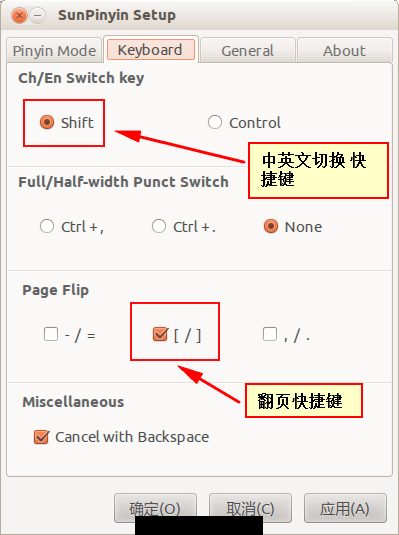
IBus(Sun PinYin)是 Ubuntu 12 自带的中文输入法,是由Sun公司开发的。默认情况下,有些操作习惯跟Windows下的“搜狗输入法”不一样,不过呢,是可以个性化定制/设置的。
在终端执行命令:
$ /usr/lib/ibus-sunpinyin/ibus-setup-sunpinyin
打开 “Sun PinYin Setup” 对话框:
作者:AlbertWen
添加时间:2017-10-29 20:17:36
修改时间:2026-09-16 05:06:28
分类:
06.Linux软件安装
编辑
CentOS 6.8 自带的 Git 版本为 1.7.1,比较旧,yum 安装也停留在 1.7.1,还是源码编译安装吧。
1. 下载源码:
wget -c https://github.com/git/git/archive/v2.12.1.tar.gz
2. 卸载老版本Git
yum remove git